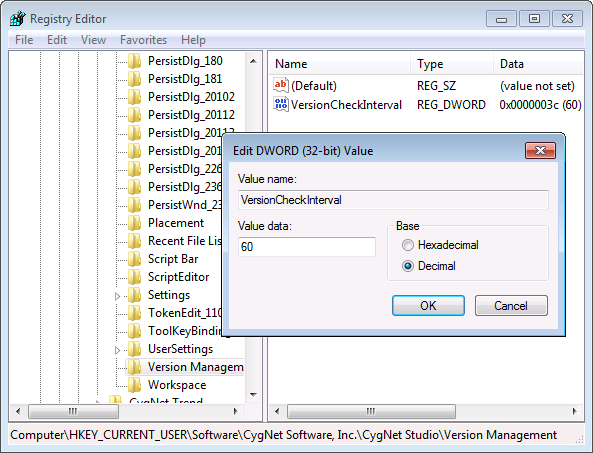
A VersionCheckInterval registry entry on a user’s computer can be used to periodically check the version of an open Studio screen against the master file stored in the BLOB file system. The entry applies specifically to CygNet Studio, CygNet Vision, and the nested CxVision Control. As such, a registry entry must be added for each.
The entry is a DWORD value listed under the application’s Version Management key that defines the time interval (in seconds) for the check. If the value is set to 0, no check is performed.
The registry keys for CygNet Studio and CygNet Vision are listed under:
|
HKEY_CURRENT_USER\Software\CygNet Software, Inc.\[application name]\Version Management |
where [application name] is "CygNet Studio," "CygNet Vision," "CygNet Vision ActiveX Control."
Enter the new value in decimal base.
In CygNet Studio and CygNet Vision the .csf file version is checked every n seconds. If a newer version of the file is detected, a prompt is displayed.
In the nested CxVision control the .csf file version is checked every n seconds. If a newer version of the file is detected, the tool runs the EventVersionNotify event. Using script the screen developer could display a prompt, automatically reload the screen, or take some other action.
|
|
|

